Riding to war on an indoor bike: three.js, WebXR, and a Rust/WASM renderer
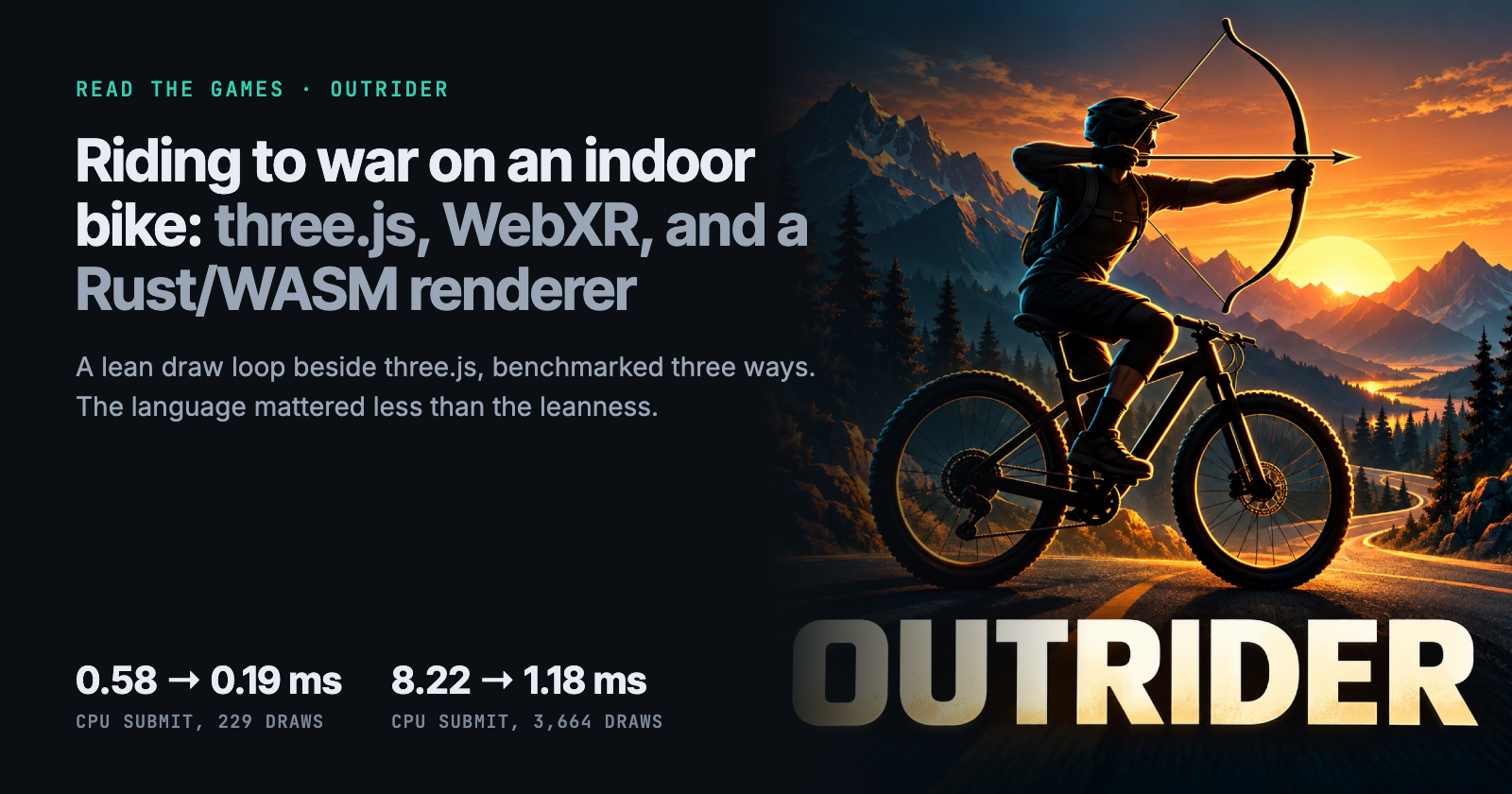
Outrider is a Meta Quest game where your indoor bike is the controller. Where to find its best moments, and what I learned when three.js spent too much CPU on draw calls: I wrote a lean draw loop in TypeScript and again in Rust/WASM, benchmarked all three, and the language mattered less than the leanness.
On this page
At a glance
- Outrider is a three.js and WebXR game for Meta Quest where an indoor bike is the controller, and one codebase ships as a website, a Quest app, and a Mac app.
- The first caves hit 1,000 to 1,600 draw calls and about 10 fps on the Quest; one InstancedMesh per prop kind per road chunk brought them under 250.
- To see how much CPU was three.js itself, I added a lean draw loop for the static world, in TypeScript and in Rust compiled to WebAssembly, hooked into three.js's opaque pass.
- On an Apple M4 in Chrome, CPU submit time fell from 0.58 ms to about 0.2 ms at 229 draws, and from 8.22 ms to 1.38 ms (TypeScript) or 1.18 ms (WASM) at 3,664 draws.
- Lean TypeScript got almost all of the win; WASM added about 15% only at extreme draw counts, so batch first, then go lean in TypeScript, and reach for WASM last.
Outrider is a VR game for Meta Quest where your indoor bike is the controller. Pedal, and you ride. Reach back for the bow, draw the string with your other hand, and loose arrows at whatever stands in the road. The whole game is three.js and WebXR. One codebase ships as a website, a Quest app, and a small Mac app. It’s part of Read The Games, my training-games project.
This post covers two things. First, the moments I think are worth your time, with the steps to reach each one. Second, the part I learned the most from: three.js was spending too much CPU on draw calls, so I wrote a lean draw loop in TypeScript and then again in Rust compiled to WebAssembly. I benchmarked all three and found a surprise in the numbers.
Draw calls, cave hall
1,600 → 162
Before and after batching
CPU submit, 229 draws
0.58 → 0.19 ms
three.js vs WASM, Apple M4
CPU submit, 3,664 draws
8.22 → 1.18 ms
16× the real draw count
WASM module
117 KB
Lazy-loaded only when chosen
Five moments worth riding to
Draw the bow in a battle
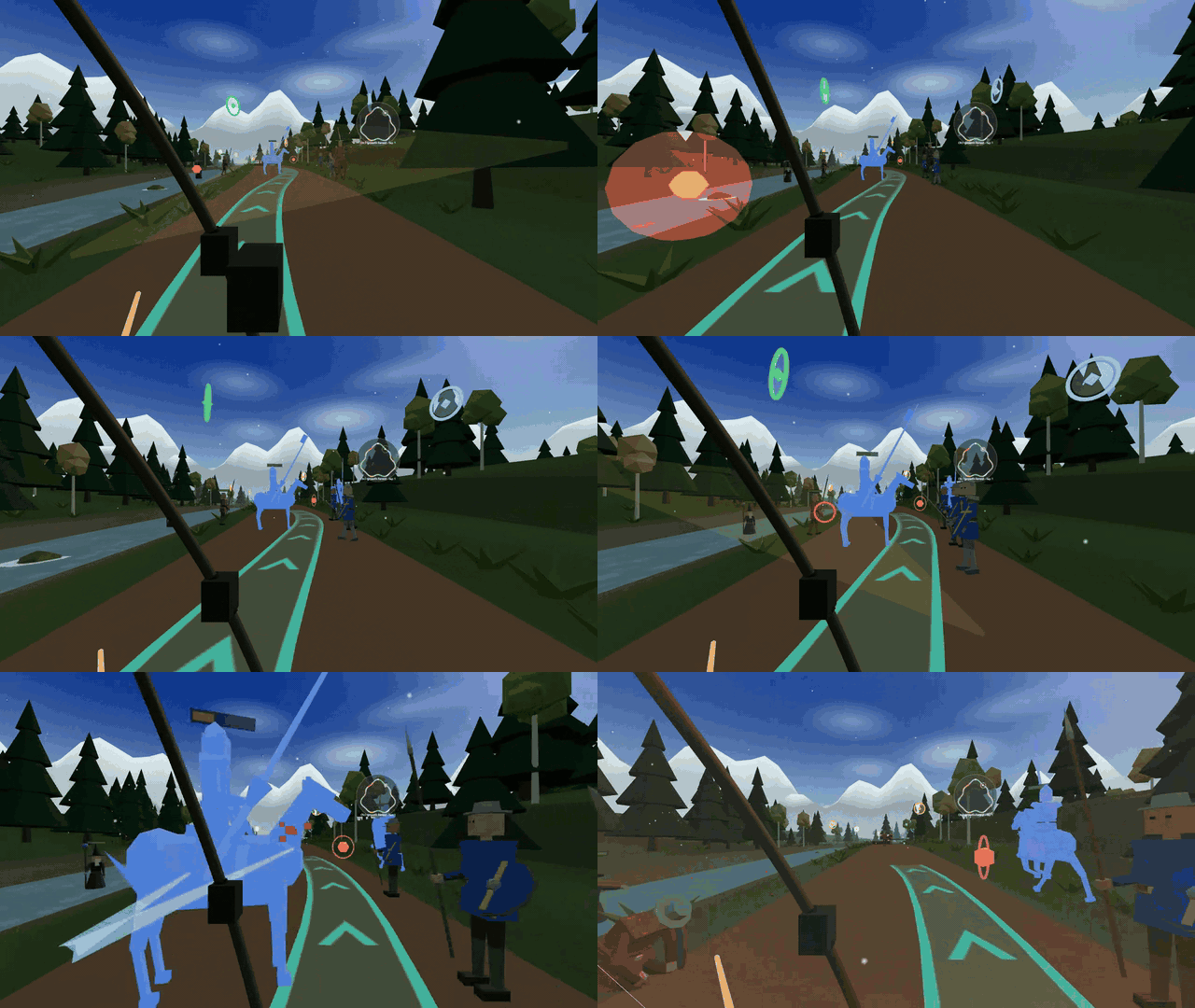
The Medieval campaign runs through a war. Armies fight on both sides of the road, and the game plans a teal “clear path” through each battle that you steer along.
- On your Quest, open readthegames.com/outrider, or the Outrider app.
- In the lobby, open RIDE, pick Medieval, and press START RIDE.
- Squeeze a grip to pick up the bow. Pull the string back with your other hand, and release.
Run the neon freeway in Overdrive

Overdrive is a race tour through a future coast. You pass seven cars, dodge cones and head-high beams, and check your rear-view mirrors for traffic overtaking you.
- Open the lobby and pick Overdrive on the RIDE tab.
- Press START RIDE, and pedal hard.
- To change lanes, hold A or X and tilt your head.
Join the group ride at Lakeview
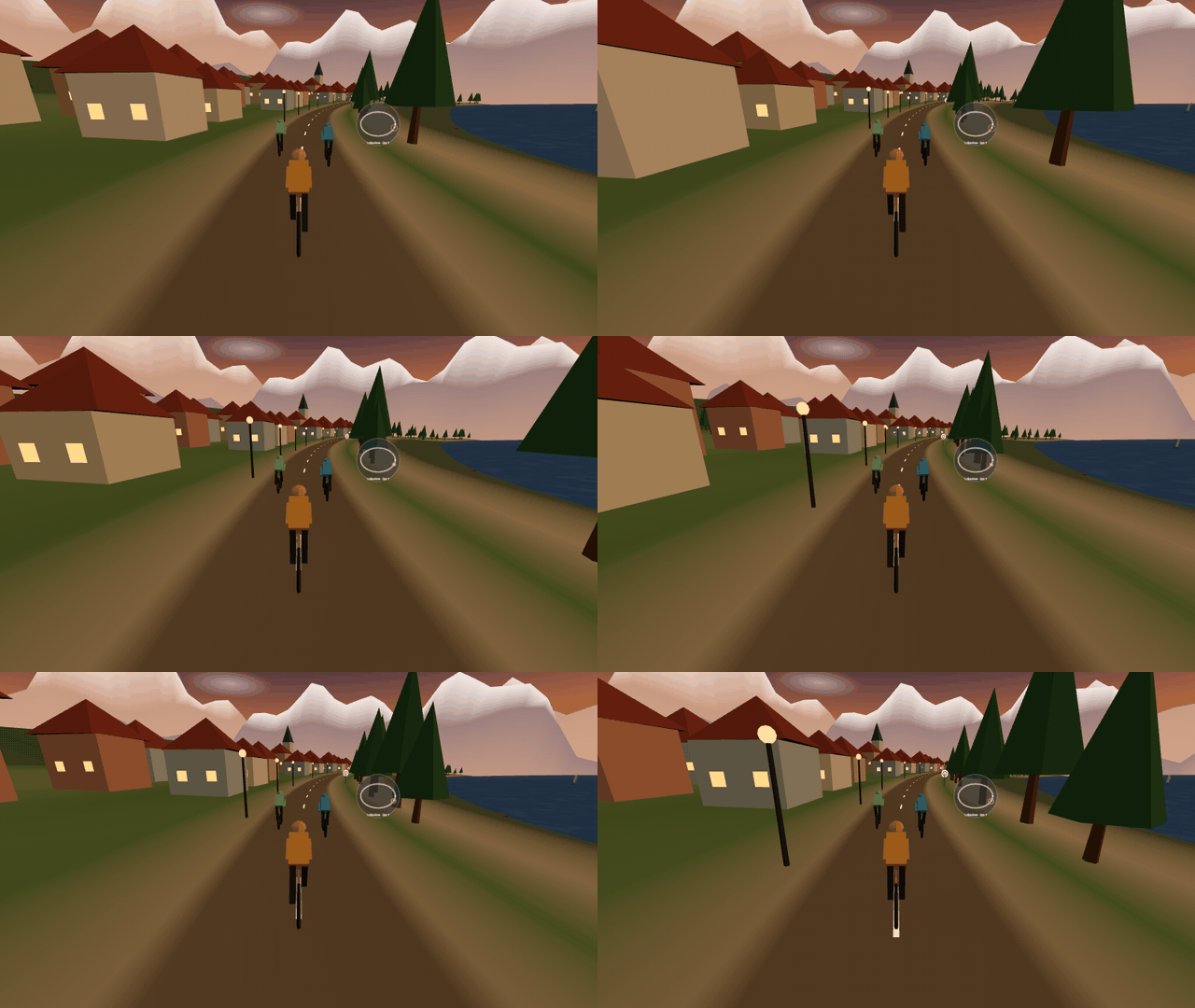
Lakeview loops around a mountain lake at golden hour. A group rides with you and calls out the pushes from your workout program.
- Pick Lakeview on the RIDE tab.
- On the WORKOUT tab, choose a program such as 4×4 or Tabata, then start the ride.
Configure everything from inside the world
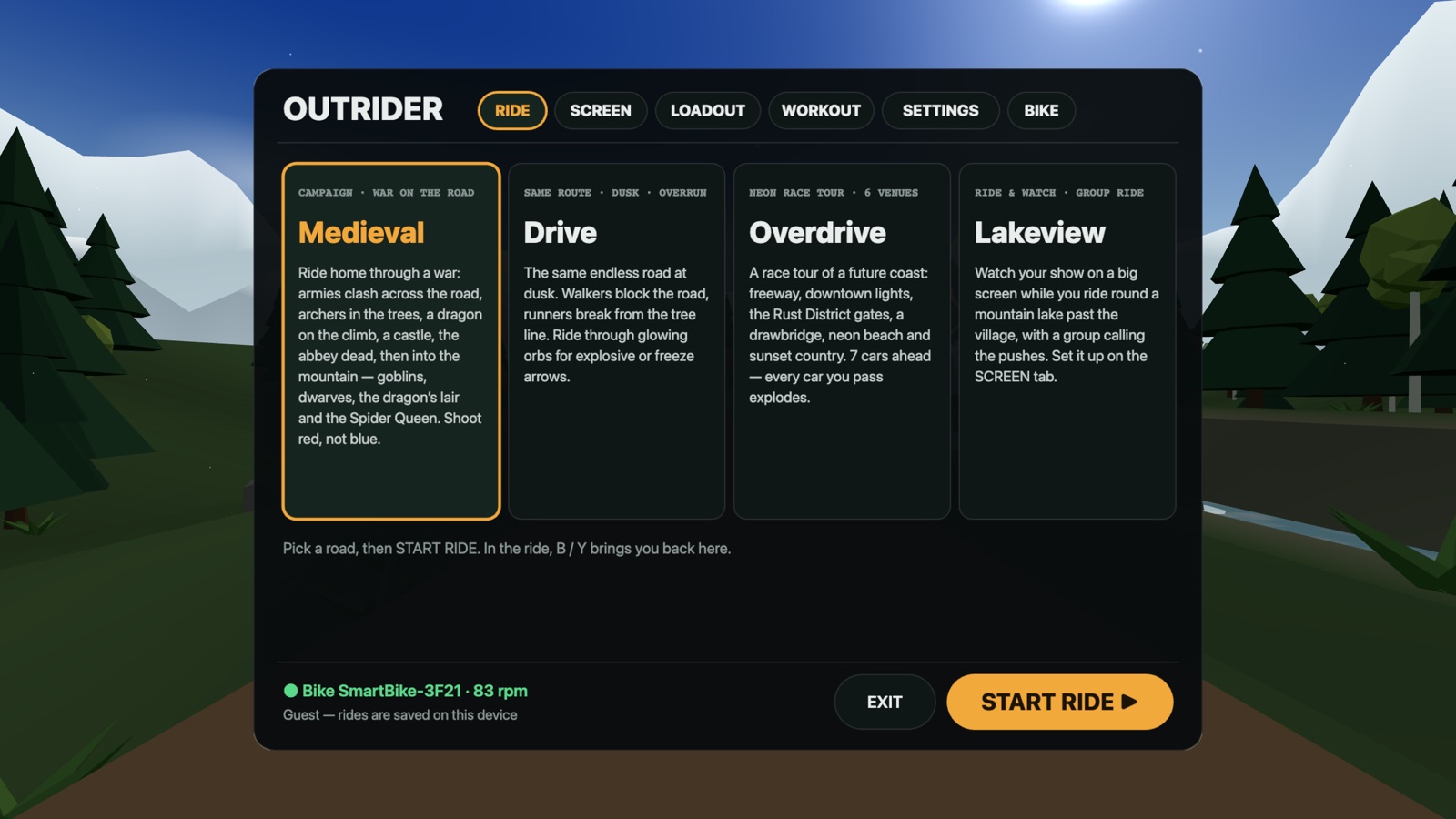
There’s no web settings page. The lobby is a canvas texture on a plane in the scene. You point a controller laser at it in the headset, or click it on a desktop. It covers mode, loadout, workout, graphics, renderer, and bike pairing. It went in with 0613575 the in-VR lobby panel .
Race in the corner of your Mac while you watch a show
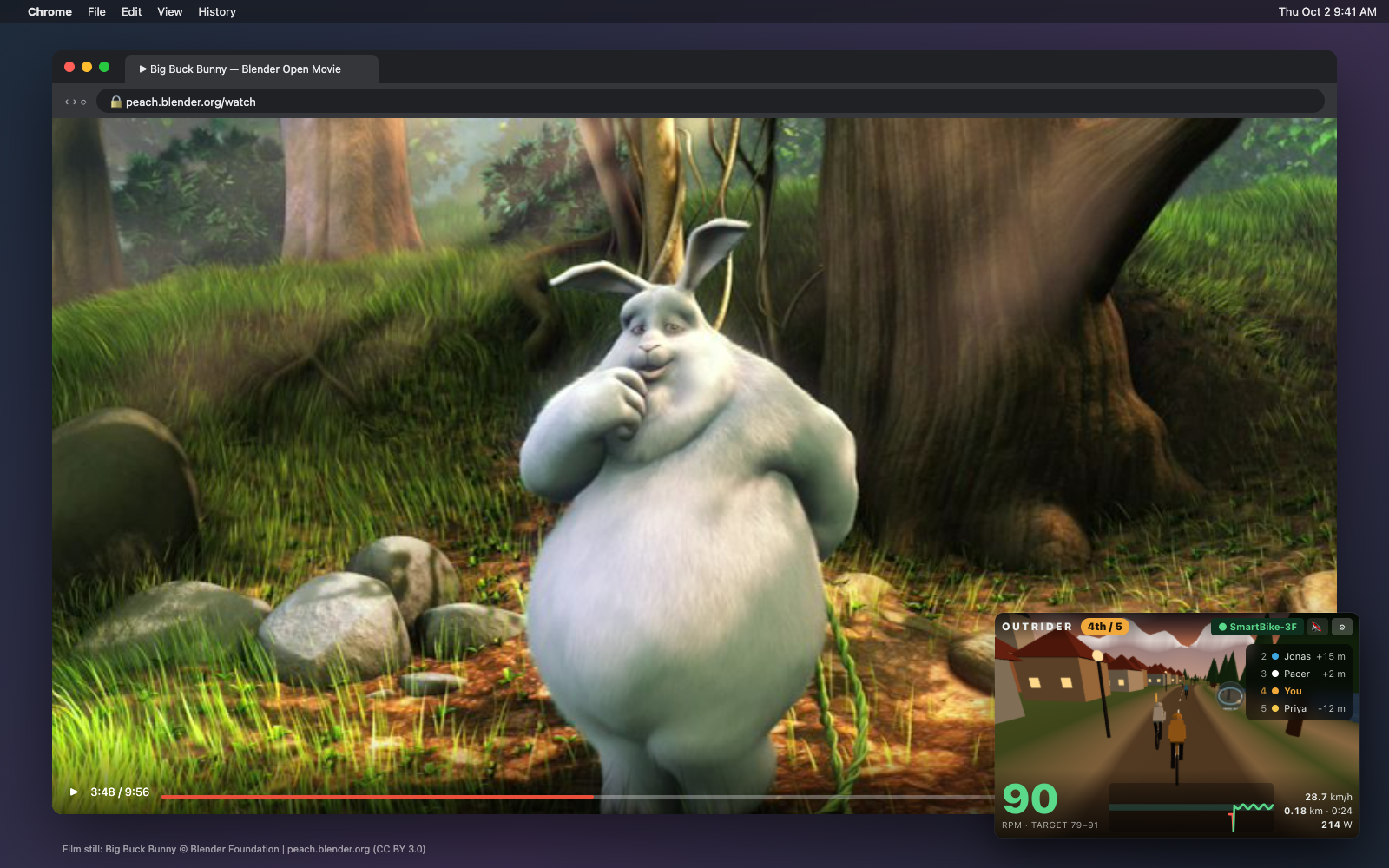
Outrider Desk turns Lakeview into a race you can keep pinned in a corner. A pacer holds your target cadence, the group surges around it, and you can pass all of them. It shipped in 4cf3af0 Outrider Desk for Mac .
- Download the Mac app from readthegames.com/download.
- Open ⚙ → Devices, and link your bike or treadmill.
- Click 📌 to keep the window on top, even over a full-screen video.
The problem: draw calls on a phone-class CPU
The Quest runs WebXR on a mobile chip, and every frame renders twice, once per eye. The first version of the caves hit 1,000 to 1,600 draw calls and dropped to about 10 fps. Batching fixed the worst of it. I grouped props into one InstancedMesh per geometry and material per road chunk, which brought the scene under 250 draws. The goblin fight went from 1,067 draws to 187 and the cave hall from 1,621 to 162 in d35b1de caves batched .
That left a question I couldn’t answer by reading profiles: how much of the remaining CPU time was three.js itself? To find out, I exported the goblin fight from the caves as a data pack. The pack holds 229 draws, about 830 instances, and 61,000 triangles. Then I drew the same pack with three renderers on a 8c378b1 benchmark page .
Building the WASM renderer
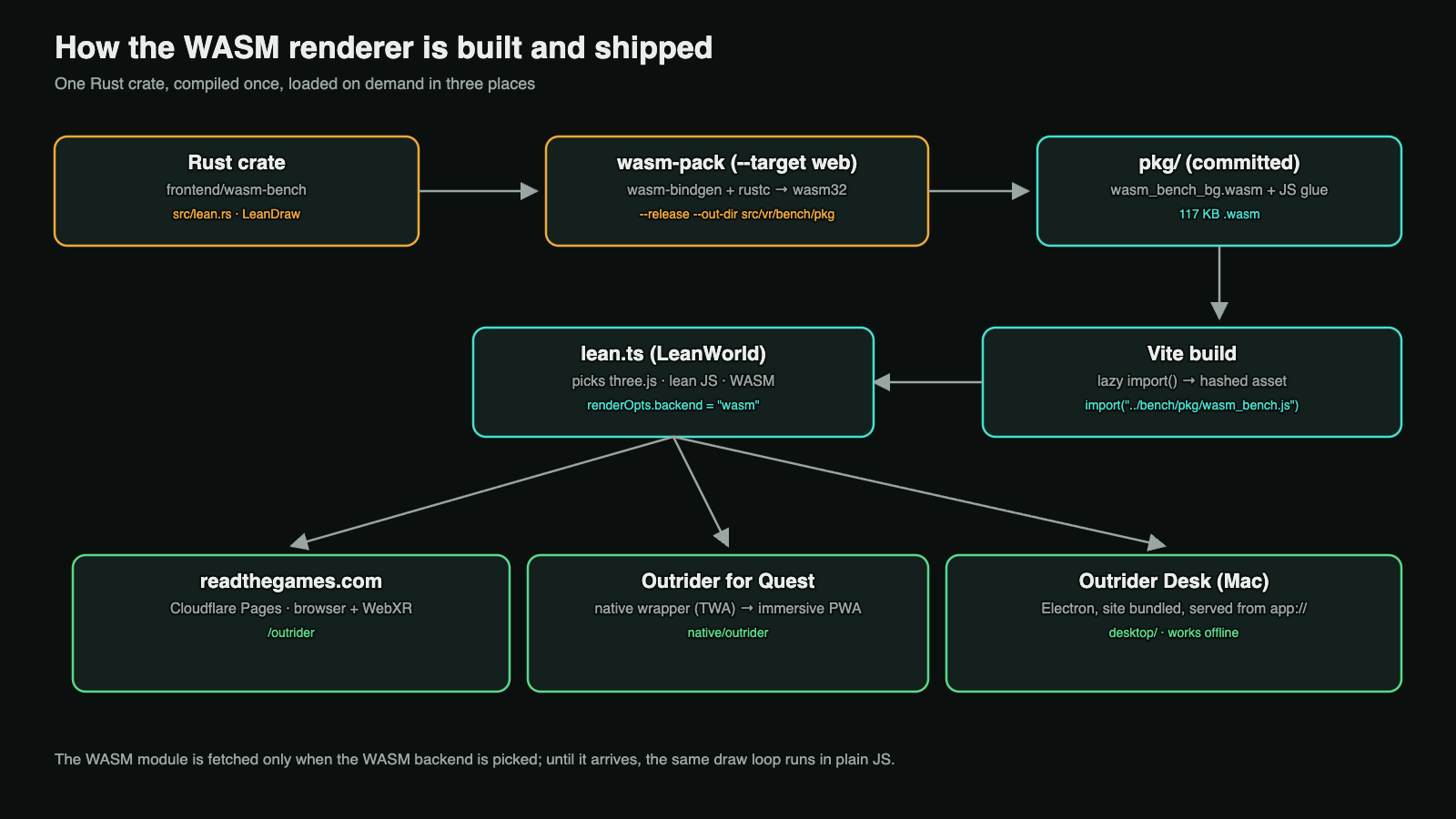
The renderer lives in a small Rust crate, frontend/wasm-bench. It uses web-sys WebGL2 bindings and exports one struct, LeanDraw. JavaScript creates it with the WebGL context and a compiled shader program, registers vertex array objects with set_vao, and calls draw(records, n) once per eye.
cd frontend/wasm-bench
wasm-pack build --target web --release --out-dir ../src/vr/bench/pkg
I commit the pkg/ output, so the frontend builds without a Rust toolchain. The module is 117 KB. Vite turns the dynamic import into a hashed asset, and the browser fetches it only when the WASM backend is active:
import('../bench/pkg/wasm_bench.js').then(async (m) => {
  await m.default()                        // fetch + instantiate the .wasm
  this.wasm = new m.LeanDraw(this.gl, this.prog)
})
Until the module arrives, the same draw loop runs in TypeScript. Nothing waits on the download.
Slotting a second renderer into three.js
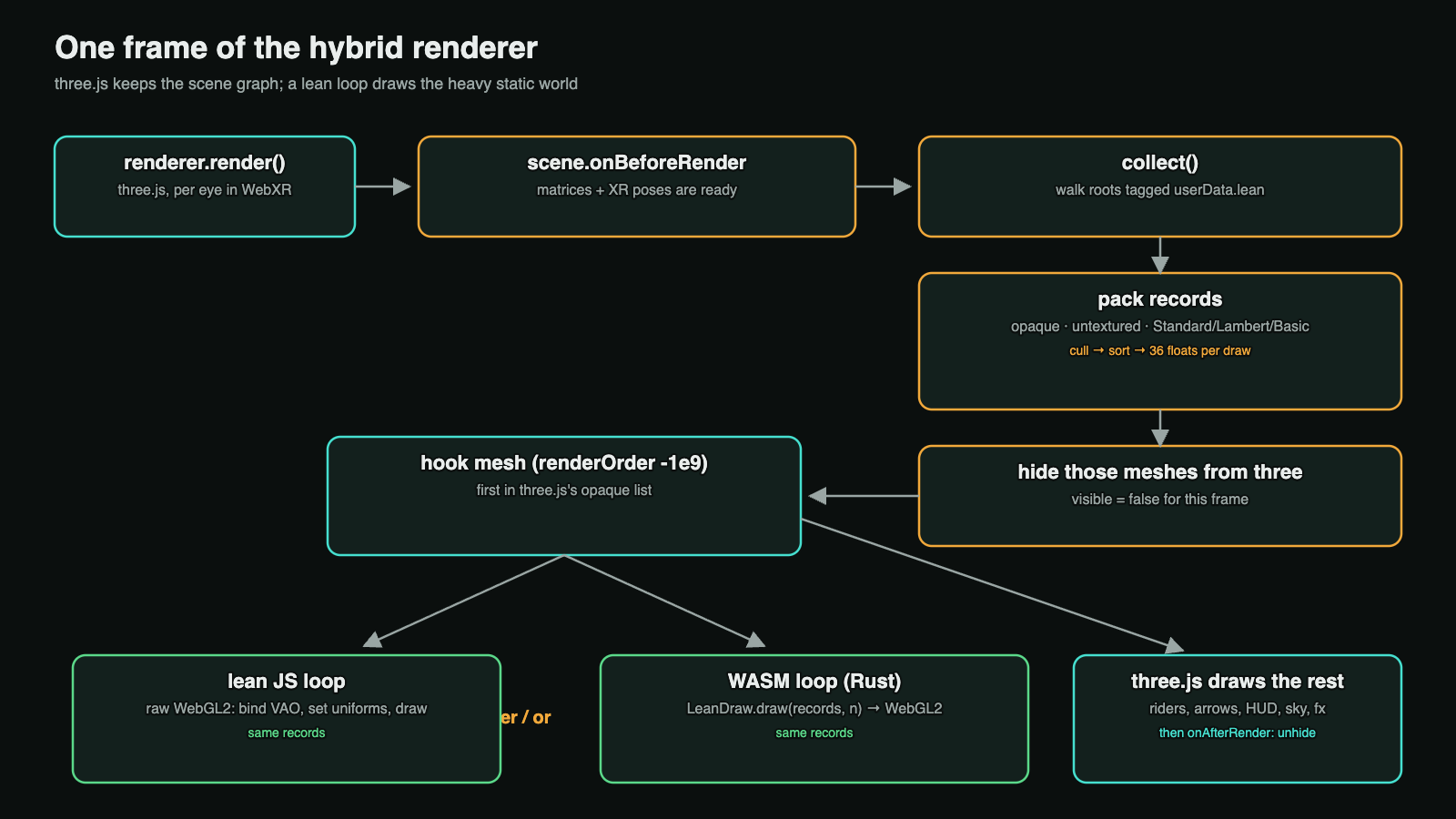
I didn’t want to give up three.js. It still runs the scene graph, the XR session, the hands, the arrows, the HUD, and every transparent effect. The lean loop, added in 10b23f0 the hybrid renderer , takes over only the heavy static world:
- Each road chunk group sets
userData.lean = true. - In
scene.onBeforeRender, matrices and XR poses are already up to date. TheLeanWorldclass walks the tagged roots and picks every mesh it can draw exactly the way three.js would. That means opaque, untextured Standard, Lambert, Phong, or Basic materials. It culls and sorts them, packs 36 floats per draw into oneFloat32Array, and setsvisible = falseon those meshes for this frame. - A do-nothing hook mesh with
renderOrder = -1e9sorts first in three.js’s opaque list. ItsonBeforeRenderruns the lean draws. By then, three.js has bound that eye’s framebuffer and viewport. - three.js draws everything else into the same depth buffer.
scene.onAfterRenderunhides the meshes.
All GL state changes go through three.js’s state cache, so the two renderers never disagree about what’s bound. The fragment shader reproduces three.js’s lighting: hemisphere, ambient, directional, and point lights, emissive color, sRGB output, then fog. I compared screenshots of the forest, the caves, and Overdrive against plain three.js until they matched.
What the numbers say
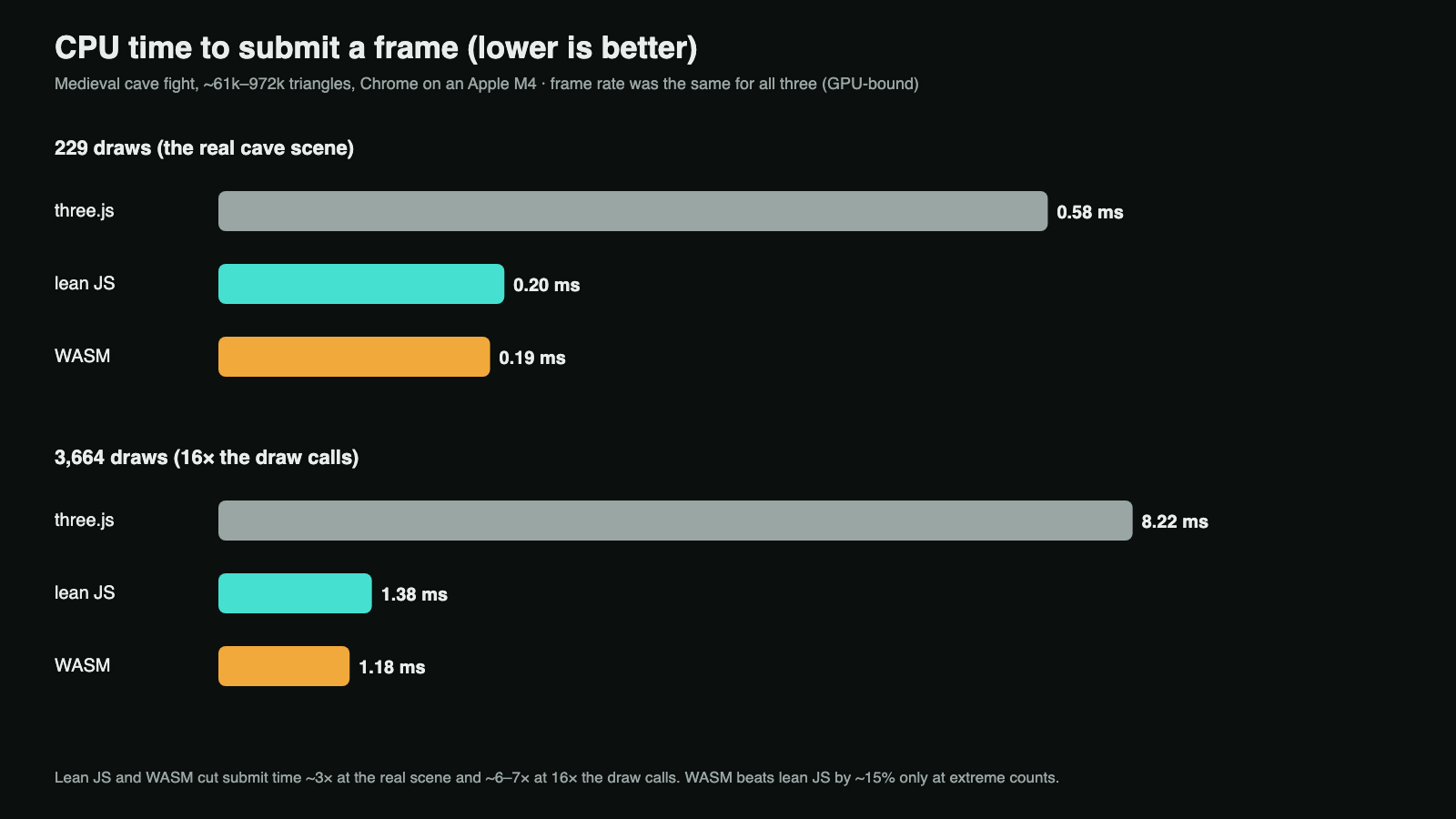
The benchmark page flies the camera through the exported scene at riding speed. Each run lasts 15 seconds after a 2-second warm-up. It records the average and 1%-low frame rates, plus the CPU time spent submitting each frame. I ran it in Chrome on an Apple M4, using the Metal GPU, at the real draw count and at 16 times the draw calls. The figures below are from the run recorded with 7451ea1 the original write-up .
| Renderer | CPU submit, 229 draws | CPU submit, 3,664 draws | Average fps |
|---|---|---|---|
| three.js | 0.58 ms | 8.22 ms | 74–75 |
| Lean JS | 0.20 ms | 1.38 ms | 73–76 |
| WASM | 0.19 ms | 1.18 ms | 71–73 |
The frame rate didn’t move, because the GPU set the pace in every run. The CPU time is where the difference shows. Both lean loops cut submit time about 3× at the real scene and about 6× at 16 times the draw calls.
Here’s the surprise: lean TypeScript gets almost all of the win. WASM beats it by about 15% at 3,664 draws, and not at all at 229. I first saw this when I added the TypeScript version as a control, line for line from the Rust loop, in 8465e0e the lean-JS renderer . The saving comes from skipping three.js’s per-object work: the scene-graph walk, material and program checks, and uniform bookkeeping. The language contributes little.
Tradeoffs
- Coverage. The lean loop draws only opaque, untextured meshes with standard materials. Textures, transparency, and custom shaders stay with three.js, so tag only the static bulk of your world.
- Lighting parity. You own a copy of three.js’s lighting math. When you add a light type or change color management, you must update the shader and re-check screenshots.
- Tooling. Inspectors that walk the three.js scene don’t see lean draws.
renderer.infoundercounts them, so I show both counts in the HUD, for example “WASM 14+77”. - WASM costs. It adds a Rust toolchain, a 117 KB download, and a JS-to-WASM call per eye. Lean JS has none of these.
If draw calls are your bottleneck, start with batching, then add a lean loop in TypeScript. Reach for WASM only when you’re submitting thousands of draws, or when you plan to move more of the frame into Rust.
One build, three places
The same renderer ships everywhere. The website runs on Cloudflare Pages. The Quest app is a native wrapper that opens the site as an immersive web app. The Mac app, Outrider Desk, is Electron with the built site bundled inside. It serves the files from a private app:// scheme that’s registered as secure, so Web Bluetooth and streaming WASM work offline. I checked the running Mac app over the DevTools protocol, and its renderer readout says “WASM 14+77”: 14 draws from the Rust loop and 77 from three.js.
Your bike connects over Bluetooth FTMS, the fitness-machine profile most smart bikes and treadmills speak. On the Quest, the native wrapper holds the connection in a background service and passes readings to the game through a local WebSocket.
What I didn’t measure
- The benchmark ran on a Mac, not a Quest. The numbers above are Chrome on an Apple M4. The Quest’s CPU is much slower, so the absolute times there will be higher; I expect the ratios to hold, but I haven’t recorded them on the headset.
- Freed CPU isn’t free frames. Because the GPU set the pace, the saving shows up as headroom for game logic, not a higher frame rate. I haven’t measured whether it also means a cooler headset or longer battery life, so treat that as a hope, not a result.
- Lighting parity is checked by eye. I compared screenshots until they matched; there is no automated pixel diff guarding the shader against a future three.js change.
A checklist if draw calls are eating your frame
- Count draws per frame on the target device before changing anything.
- Batch static props with
InstancedMeshper geometry and material, per chunk. - Export one heavy scene as a data pack so every renderer draws the same thing.
- Measure CPU submit time, not just fps, when the GPU sets the pace.
- Write a lean loop in your existing language first, as the control.
- Add WASM only if the control leaves a gap worth a toolchain and a download.
- Keep three.js for transparency, textures, and anything dynamic, and hide tagged roots, not parents.
You can ride it at readthegames.com/outrider, or get the Mac app at readthegames.com/download. If your team is weighing a rewrite to fix performance, I’m happy to help you measure first: /hire.