Teaching simulated footballers to play like real ones: three review loops
Ten days of Read The Games: 11-a-side matches, a decision trainer, game review on the phone, motion capture, and boxing and sword fights in the headset. The part worth copying is how I checked the AI against reality: replayable seeded games, annotated reviews, and tracked match footage, each one closing a loop with a number.
On this page
At a glance
- From October 8 to 17, Read The Games got 151 commits: 11-a-side matches with offside, a decision trainer and game review on the phone, motion-captured bodies, and boxing, kickboxing and sword fights in Overtrain.
- Most of the work was making the AI look like football. Three review loops did it, and each one ends in a number, not an opinion.
- Loop 1: every game replays from a seed, on any device. Math.sin differs in the last bit between browsers and Node, so a 50-line math module makes the phone and the test tool play the same game.
- Loop 2: I annotate seeded games on my phone, a script reads the notes back, and each fix names the seed and the moment it fixes.
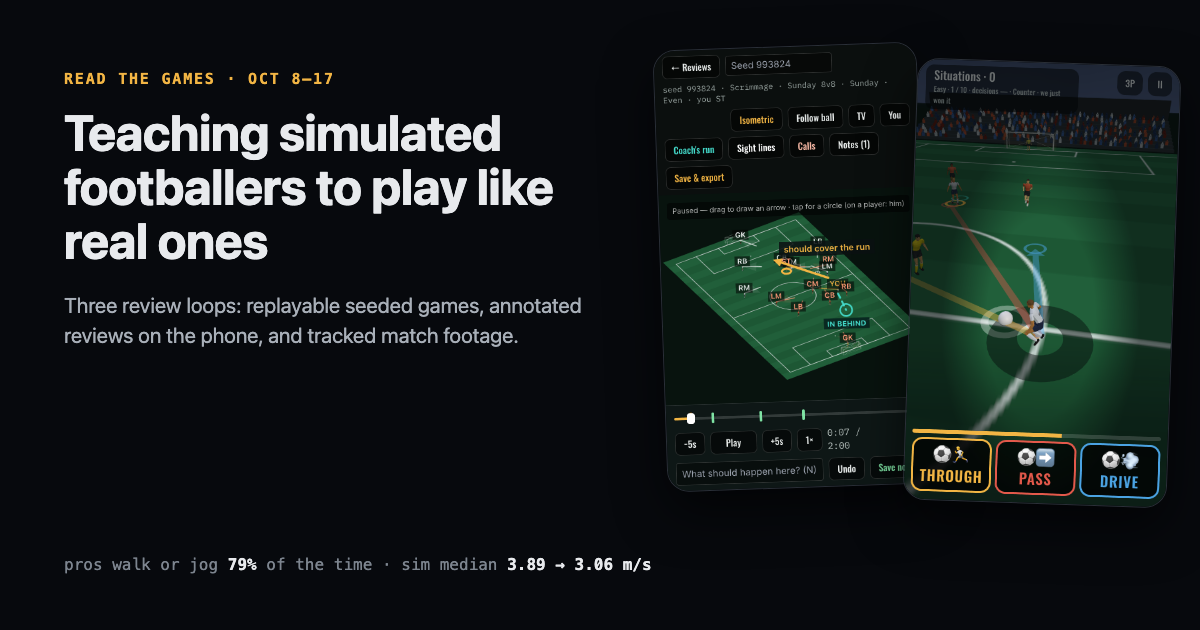
- Loop 3: player tracks from a tactical-cam match. Pros walk or jog about 79% of the time; the sim ran or sprinted about 60%. Pacing fixes took the 11v11 median speed from 3.89 to 3.06 m/s.
Read The Games is my training-games project: soccer drills and matches in a Meta Quest headset (Overtrain), on an indoor bike (Outrider), and on your phone (readthegames.com/app). Last week’s post was about getting a pitch to sit on your living-room floor. This one covers October 8 to 17: 151 commits, again with Claude Code as my pair.
The floor problem is solved. The new problem is harder to measure: does it look like football? A defender who chases in a pack, a striker who tracks back to his own goal, or a whole team that sprints everywhere all teach you the wrong habits. You can’t unit-test “looks like football”, so I built three loops that turn it into numbers. That’s the tutorial part of this post. First, what shipped.
Commits
151
October 8–17
Median player speed
3.89 → 3.06 m/s
Pro 11v11 AI; pros on film: 2.4
Breakaways per minute
0.57 → 0.03
Middle third, 11v11, after offside
Phone and Node games differ
55 s → never
Same seed, after the math fix
What shipped
On the phone
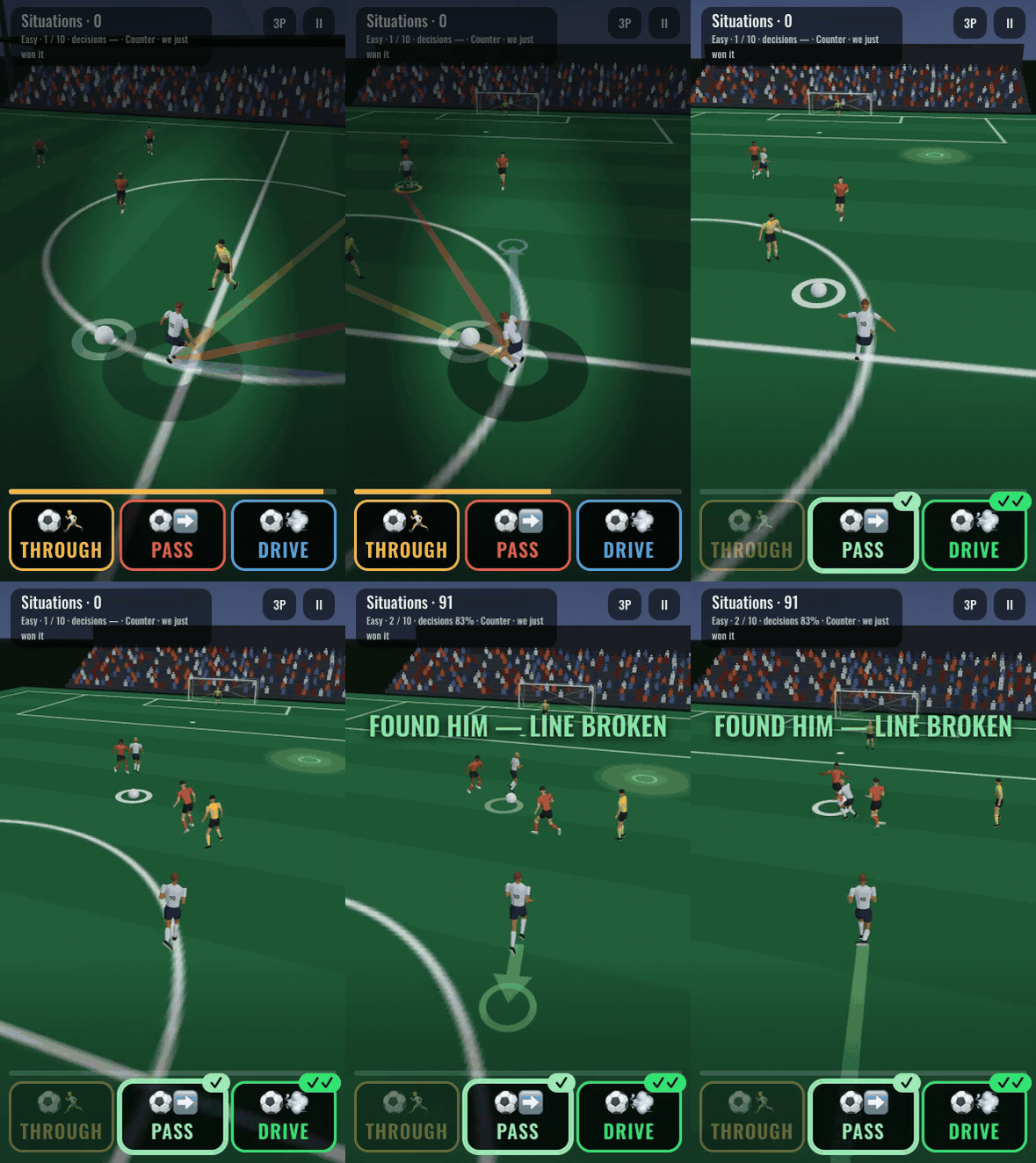
- Situations, a decision trainer. It runs inside the live 8v8 match and never pauses it. When the ball comes to you, you get three one-word choices (THROUGH, PASS, DRIVE, SHOOT, TURN…), each with a colour, an arrow and a ghost of what would happen. The AI plays your body, so you only decide. The match plays your choice out, and you’re graded on the button: ✓✓ best, ✓ good, ✗ bad. Five speeds give you from 2.6 s down to 0.65 s to choose.
- Game review. Make a match from a seed, let the AI play it, then watch it from an isometric camera. Pause, drag an arrow, tap a circle, write a note, export a file. More on this below, because it drives most of the AI fixes.
- Saved matches. A match you play on the headset can be saved and reviewed on your phone. Saving is always your choice, never automatic. Files go to the device and to your account (R2 for the file, D1 for the list).
- Match replay. A recording of one of my own Sunday games, rebuilt top-down as a guided tour: the key moments, where I should have checked my shoulder, where to stand, what to shout. The clips are other players’ footage, so they stay private.
- Motion studies. One situation at a time, slowed down, so I can critique how the footballers move. It’s how the bodies got better (see loop 4).
In the match engine
- 11v11 is eleven a side, all live, in a 4-3-3, with offside. 8v8 has no offside, and its keeper can’t kick past halfway. Both are real rules of the formats I play, and every tactical fix has to hold in both.
- Team styles for the 11v11 opponent: balanced, possession (a back three building), direct (a low block) and press (a high line).
- Kick-offs from a real match. The line-up and the first ball copy the Brest v PSG tactical cam.
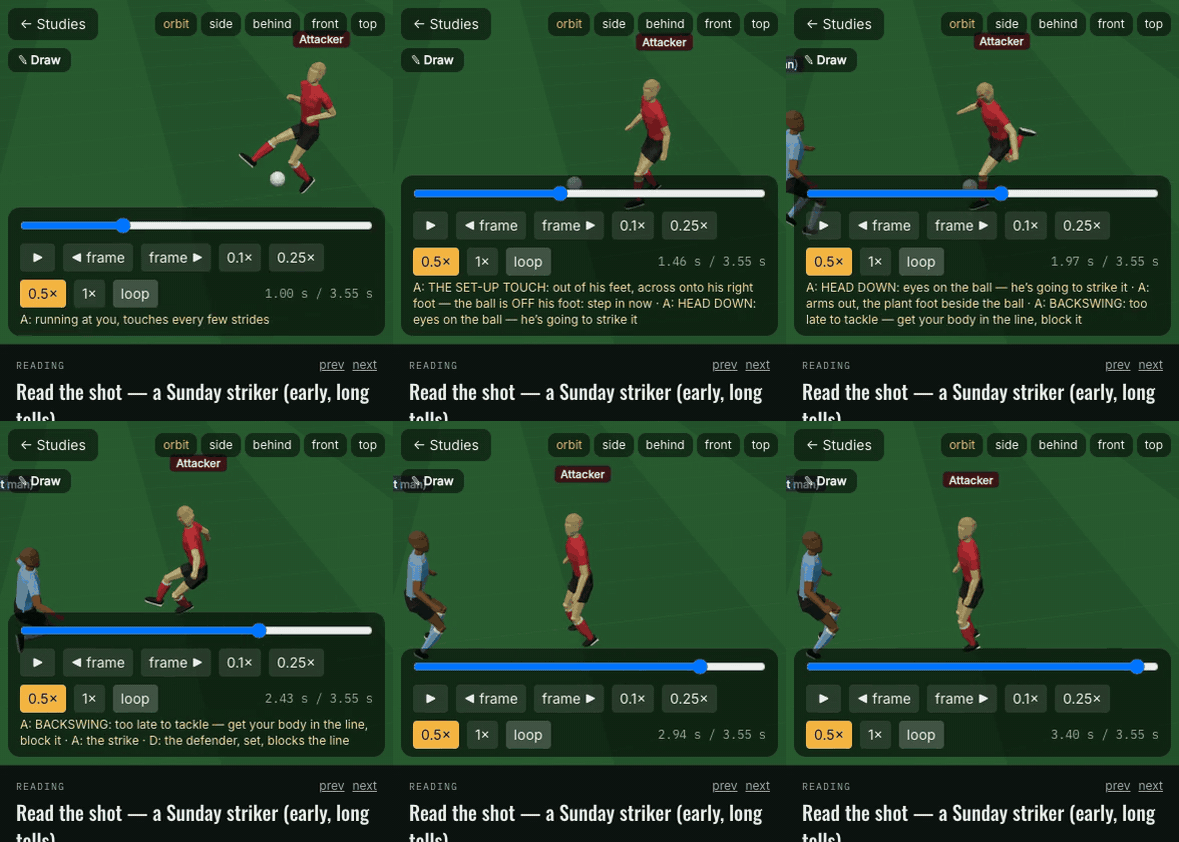
- Tells. Before a shot, players show a set-up touch, a head drop, a plant and a backswing. Amateurs show them early and long; pros late and short, and they disguise passes. Close one down mid wind-up and a good one fakes it.
- Defending that holds. One beaten man chases, the rest recover goal-side. The last man doesn’t step out alone. Defenders jockey and read feints.
- Bodies. A low-poly footballer with shin guards, boots and shirt numbers, running and kicking from motion capture (Carnegie Mellon’s free mocap library, retargeted to our skeleton).
In the headset
- Match in Overtrain, with bike mode: the controller stick moves you, and pedalling fills your sprint tank.
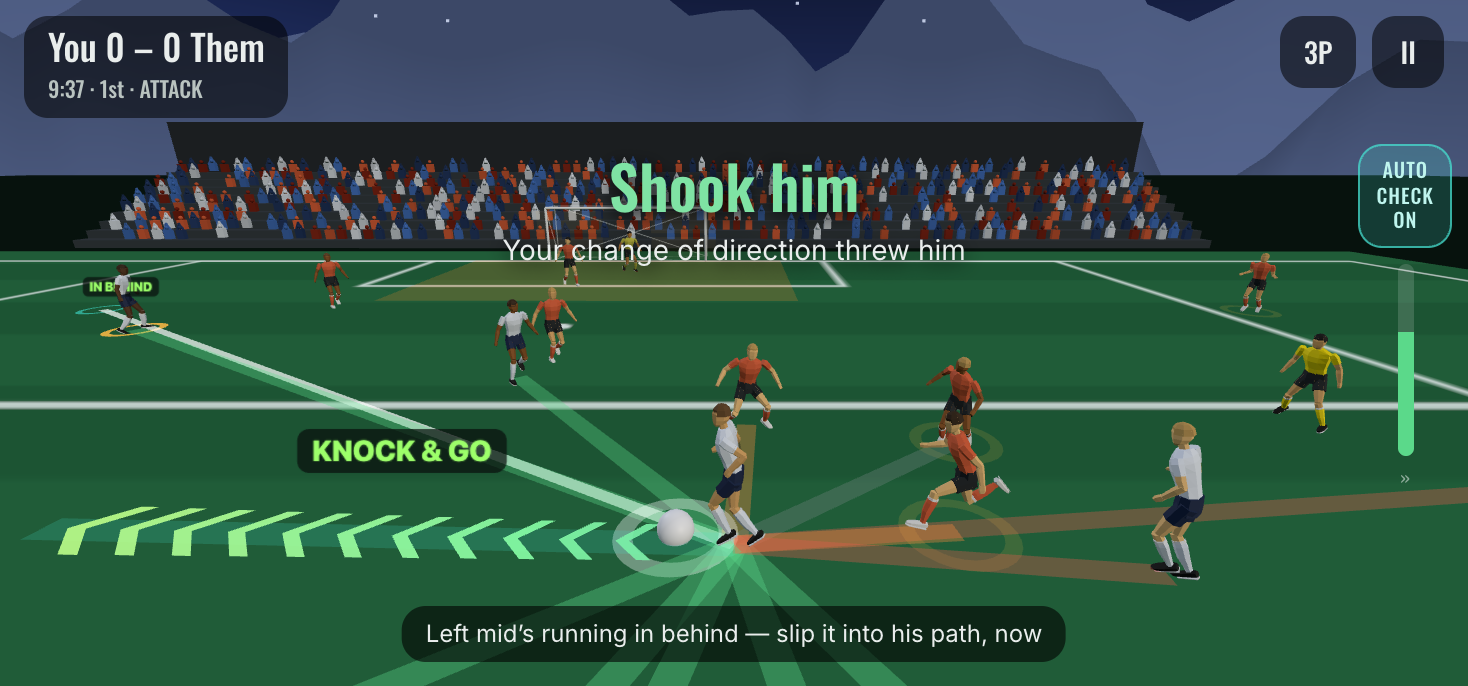
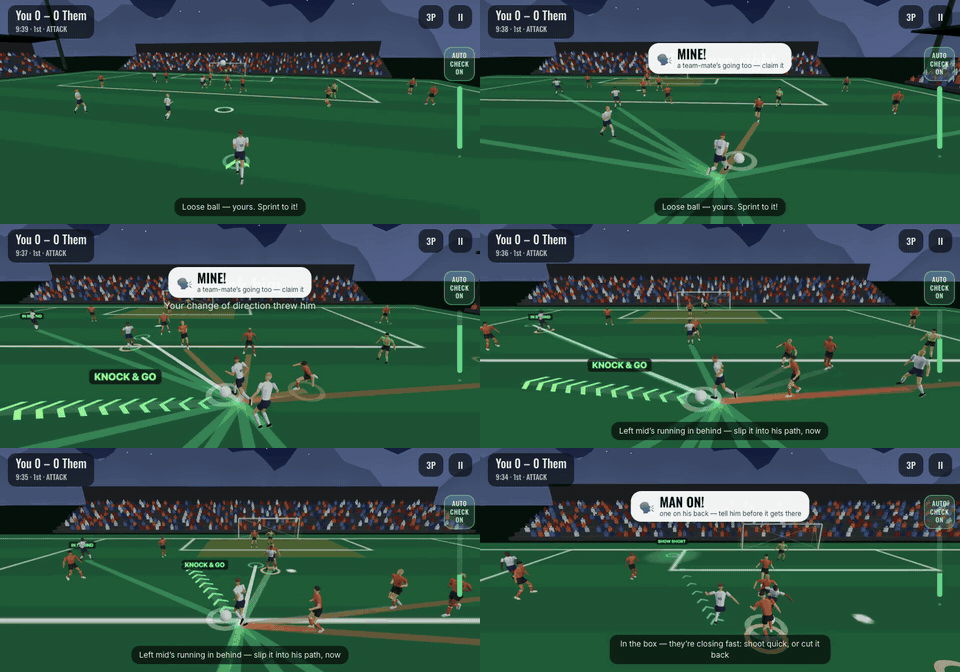
- A scan coach. In the headset match, an arrow low in your view says “check this shoulder” when a pass can reach you and you haven’t looked that way for 2 seconds. A controller buzz says CHECK! as the pass is played. After the match it rates seven habits (scanning, body shape, receiving on the back foot, and so on) against a pro reference.
- New drills. High Ball (win a long ball against a centre-back who reads it too), Track & Press, 3v2 ⇄ 2v3, Get Open, and Defend the Break. The Last Man attacker now brakes and cuts across you, copied from my own game footage.
- Combat. The sword fight was rebuilt on a real fighter rig, with historical guards and cut lines, and you can hold the sword two-handed. Kickboxing and boxing arrived: spar against one to three fighters, hit a coach’s pads, and a “Longevity” round that works the legs, hips and back. Boxers circle and work in and out, and they fight in a ring; sword fights happen in a dojo.
- REVIEW. Your saved games appear on a tabletop model in front of you. Point the controller to draw arrows and circles, and the notes go into the same file the phone shows.
Loop 1: make every game replayable
A review loop needs one thing first: when I point at a moment and say “that was wrong”, you can play the exact same moment again, after the fix, on a different machine. For a simulation, that means determinism.
The match sim already ran on a fixed 60 Hz step with no rendering inside it. It used Math.random, which is easy to seed. The surprise was Math.sin.
The bug: same seed, different game after 55 seconds
The first game-review file I made on my phone didn’t replay in Node. Same seed, same settings, same code. The two games matched for about 55 seconds and then went their own way.
JavaScript’s Math.sin, Math.cos, Math.atan2 and Math.exp are allowed to differ in the last bit between engines, and they do. In a physics step, a last-bit difference in a player’s heading changes where he is a tiny bit, which changes who wins a loose ball a minute later. Chaotic systems turn rounding into a different match.

The fix: math that only uses exactly rounded operations
IEEE 754 requires +, −, ×, ÷ and √ to be exactly rounded, so every engine gets the same bits. So the fix is to compute the transcendentals from those alone, with the same polynomial kernels the classic C math library (fdlibm) uses. It’s about 50 lines, accurate to about 1e-15:
// detmath.ts: sin, cos, atan2, exp, acos, hypot from + − × ÷ √ only.
const ksin = (r: number) => { const z = r * r; return r + r * z * (S1 + z * (S2 + z * (S3 + z * (S4 + z * (S5 + z * S6))))) }
const kcos = (r: number) => { const z = r * r; return 1 - 0.5 * z + z * z * (C1 + z * (C2 + z * (C3 + z * (C4 + z * (C5 + z * C6))))) }
function reduce(x: number): [number, number] {          // x → (quadrant, remainder in [−π/4, π/4])
  const n = Math.round(x * INV_PIO2)
  return [((n % 4) + 4) % 4, (x - n * PIO2_HI) - n * PIO2_LO]
}
export function dsin(x: number) {
  const [q, r] = reduce(x)
  return q === 0 ? ksin(r) : q === 1 ? kcos(r) : q === 2 ? -ksin(r) : -kcos(r)
}

// rng.ts: a seeded game runs with Math.random and the transcendentals swapped in.
export function withSeed<T>(seed: number, fn: () => T): T {
  const real = Math.random
  Math.random = mulberry32(seed)
  try { return withDetMath(fn) } finally { Math.random = real }
}
It’s a little slower than the built-ins, which doesn’t matter: a 2-minute game generates in about 4 seconds on a phone. d8bbb4f Game review — a Match game from a seed, watched isometric, annotated, exported added it, with a test that the browser and Node play identical games.
The second bug: the file, not the AI
A week later a review note said players were “dribbling upfield facing their own goal”. That looks like an AI bug, and it wasn’t. The sim lets a heading wind past ±2π as a player turns, and the review file packed headings into a 16-bit integer at ×5000, which clips at ±6.55 radians. About 37% of running frames in a replay showed a stuck heading. The live game was fine. db86af8 players no longer freeze facing one way in game replays wraps headings before packing and repairs old files on load.
The lesson: when a review shows something odd, check that the replay matches the sim before you touch the AI.
Loop 2: annotate a game, then cite the seed in the fix
With replayable games, reviewing becomes cheap. On my phone, in Game review:
- Tap CREATE GAME FOR REVIEW. Pick the format, level, opponents and my position. The AI plays me; 2 minutes of game take about 4 seconds.
- Watch it isometric, at ¼ to 2× speed. When something looks wrong, pause.
- Drag on the pitch for an arrow (where he should have gone), tap for a circle (who), and type one line (“should cover the run”).
- Export. The file holds the seed, the settings, the notes in pitch metres snapped to players, the events, and frames at 5 per second (about 110 KB for 2 minutes).
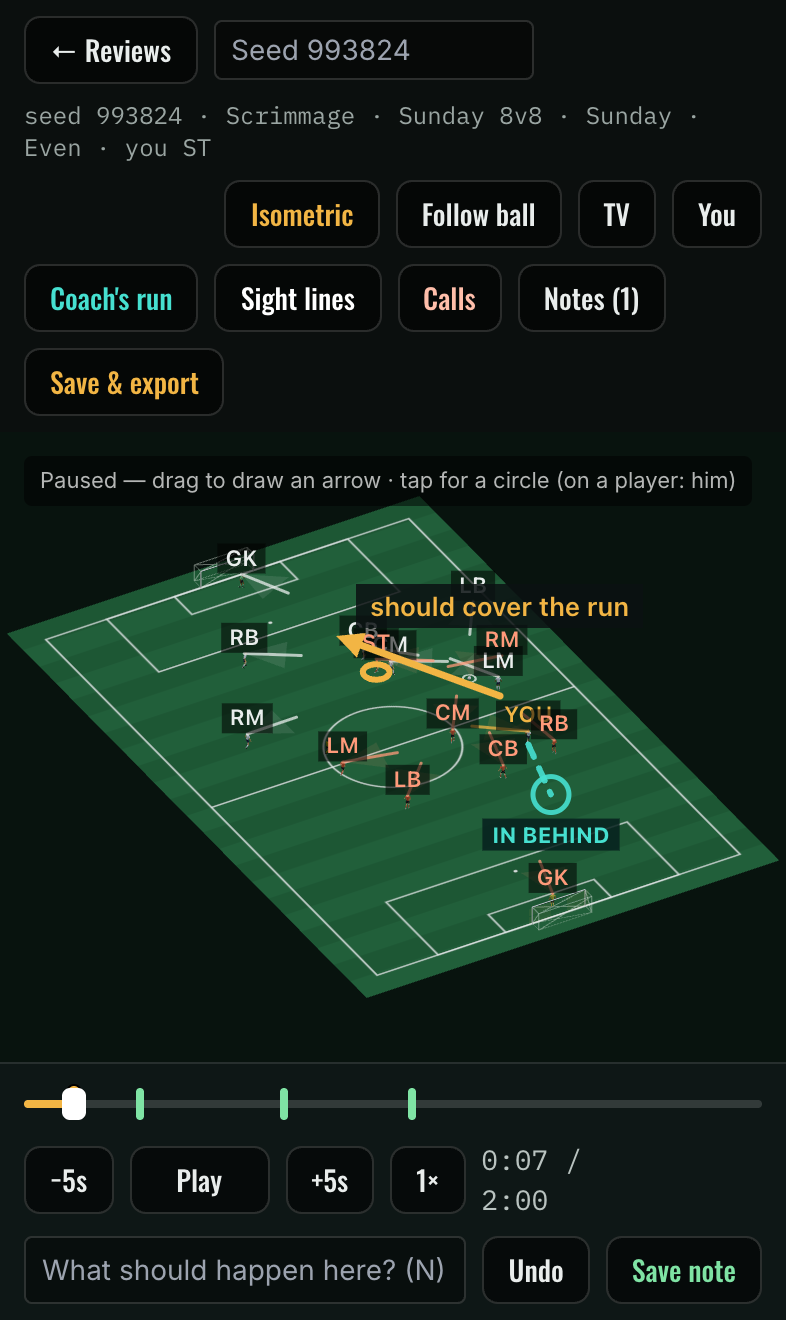
Then Claude runs one script over the file. It replays the seed, and for every note prints who the arrows and circles point at, who had the ball and what just happened. That turns “this looks wrong” into a sentence about a player and a rule.
The fix commits name the seed and the moment, which makes the history easy to audit:
-
54baceba keeper with it in his hands waits for a safe ball and throws it (review seed 787603, 0:42) -
c69a54fno free ball all the way back from the last third (review seed 695370, 1:38) -
b8d354bwide men high and wide on the ball, runs that ride their line (review seed 634028)
Every fix gets a harness number
A note is one moment. A fix changes every game, so each one also gets a headless harness that plays many seeded games in Node and counts the behaviour. Some from this week:
- Beaten defenders (
beaten-sim.ts). Before, the nearest man pressed the ball, and often that was a man who’d just been beaten, so they chased in a pack. Now the nearest goal-side man steps out and one beaten man chases. “Only beaten men pressing” fell from 50–60% of situations to 0–3%. - Levels (
space-sim.ts). The levels only played faster, not differently. Now each level sets how tight markers are, how far out of their zone they pick a man up, how hard the counter-press is and how much the block squeezes. From Recreational to Pro, their block shrinks from 524 to 397 m², your space off the ball from 4.2 to 3.4 m, and your time on the ball from 2.4 to 1.9 s. - Boxing spacing (
spacing.test.ts). A simulated minute per mode checks that fighters stay at least 0.75 m from you and 0.95 m from each other while they circle.
Every movement change also reruns the general harnesses: how often players clump, short-pass completion, how many back passes. A fix that makes defending better but triples the clumping isn’t a fix.
Loop 3: compare against real footage
Reviews catch moments that look wrong. They can’t catch something that’s wrong everywhere at once, like the overall pace of the game. For that I needed real players, so I built a footage pipeline (as a Claude Code skill, so it’s repeatable):
- Download a tactical-cam match clip in 1080p. Tactical cam beats broadcast: it shows the whole team and doesn’t cut away.
- Pull frames, detect players, and track them across frames.
- Calibrate the camera against the pitch lines, so tracks are in pitch metres, not pixels.
- Stage the sim from the same moment (same positions, same ball), let it play, and compare the paths and the summary numbers.
- Check each fix against a clip it wasn’t tuned on.
The first study was 30 seconds of Manchester City v Tottenham. Top speeds already matched. What didn’t match was how often players ran.

Pros walk about 40% of the time and jog 39%, with a median speed of 2.4 m/s. The sim had them running or sprinting about 60% of the time, at a median of 4.3 to 4.6 m/s. Football is mostly walking, with short bursts when something happens.
Three commits closed most of that gap:
-
14825a2pros walk most of the time : off the ball, pace follows the distance to go. Within a step, he stands. A few metres, a walk or jog. A run only when he’s well off his spot. Showing for the ball stays sharp. -
98b1fff11v11 pace : attackers reposition in steps of at most ~10 m instead of dashing 20 m after every pass, only the receiver chases our pass at full speed, and after about 3 seconds of sprinting a player is held to a run until he recovers. The median fell from 3.89 to 3.06 m/s. -
c1b254b11v11 plays its real shape : the shape was an 8v8 pitch’s shape on a bigger field. Team depth went from 30 to 36 m (real: 37–38).
The held-out check: on a clip the fixes weren’t tuned on, the average gap between real and simulated paths 4 seconds in fell from 12.2 to 9.3 m.
What this loop also found
Footage shows things nobody puts in a review note:
- Duels last. A real duel is a contest that takes seconds, with the man on the ball shielding. In the sim, every touch of contact was a turnover. Now a carrier can hold a duel, more often at higher levels. Pro 11v11 losses fell from 4.9 to 4.0 a minute.
- The last man doesn’t step out. With offside in 11v11, the deepest defender holds goal-side instead of pressing a forward with nobody behind him. Breakaways from the middle third fell from 0.57 to 0.03 a minute.
- Real players as ghosts. The tracked players can be drawn on the isometric review as ghosts, so the sim and the real match play side by side from the same moment.
Loop 4: bodies you can critique
The first three loops are about decisions and positions. A footballer can be in the right place and still look wrong: arms flung behind while backpedalling, legs that twist, a ball that moves without being touched.
Motion studies is the review tool for bodies. Each study is one situation (an inside pass with no pressure, a turn with a man on, a sprint, a press), looping slowly with an orbit camera. I draw on the frame and leave a note, and the fixes go into one shared rig. A motion director maps what the sim decides onto rig moves, so a fix in a study reaches the match, the drills, Overtrain and Outrider at once. A test fails if a study move isn’t wired into the match.
This week the rig got motion capture. A small bake script retargets runs, sprints, presses and kicks from Carnegie Mellon’s motion-capture library onto our footballer, by bone direction and scaled to our legs. One finding from it: the first “run” capture was only 3.6 m/s, a jog for a footballer. Real sprints come from other takes at about 7 m/s, blended in above 5.5 m/s.
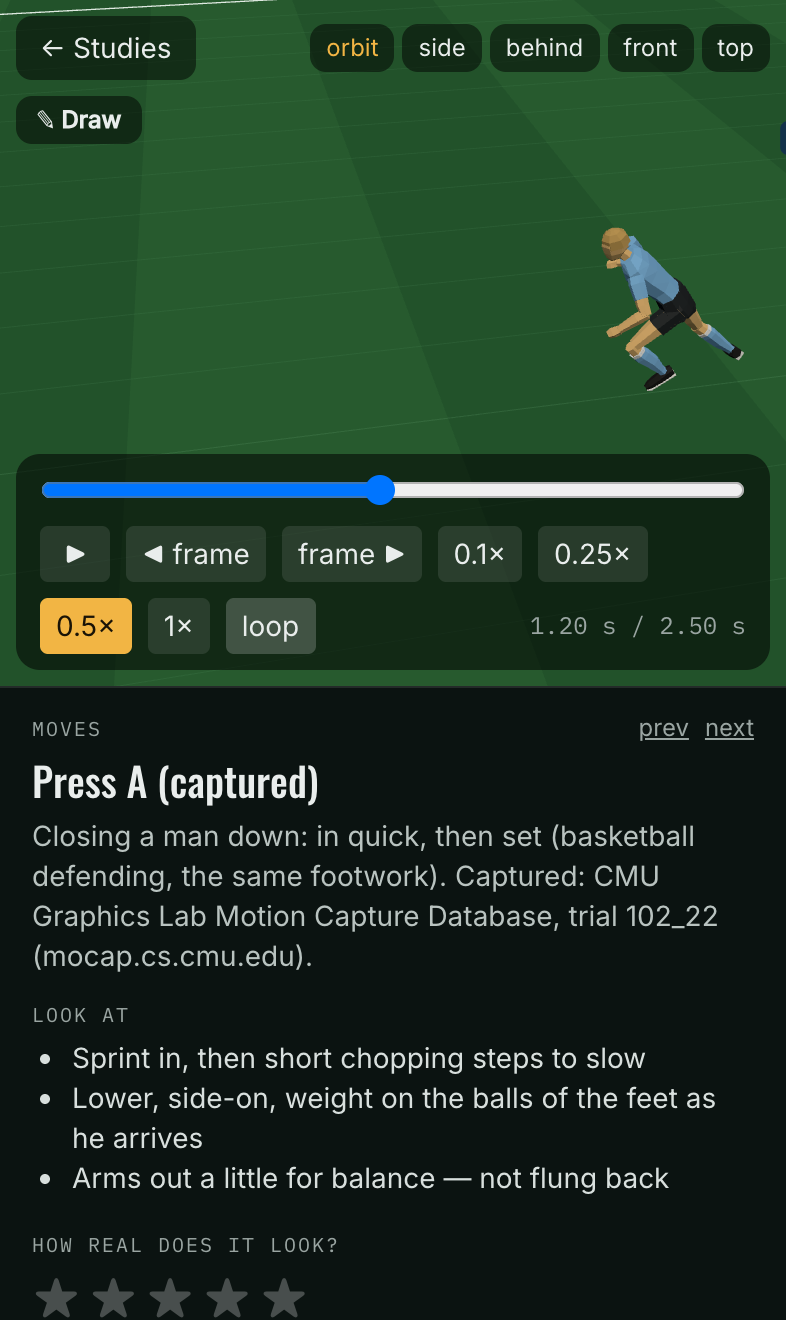
The tells came out of this loop too. Reading a shooter’s wind-up is a skill you can train, so the body has to show one. A set-up touch puts the ball off his foot, then come the head drop, arms out, plant and backswing. A Sunday-league player shows them early and for long; a pro shows them late and short. Studies has a “Reading” group to compare them, and Last Man uses them, so you learn to step in before the backswing.
The combat side
Overtrain isn’t only soccer. The same review habits applied to fighting:
- The sword fight runs on a real fighter rig: two-bone limbs, guards from the Bolognese and German schools, and five cut lines, each in three readable phases. One to three swordsmen flank you and strike at the opening you leave.
- Boxing pads are physical. The mitts recoil with punch speed, combos grow with the level, and the coach swings for you to duck or slip.
- A 2v1 spar has a “lurker” who bursts in when you trade with the presser or turn away.
What went well
- Every opinion became a number. “The defending feels off” turned into “only beaten men pressing: 50–60%”. Fixes stopped arguing with each other, because each one had to keep the other harnesses green.
- Determinism paid for itself in a day. Without identical replays across devices, a review note is a vague memory. With them, it’s a test case.
- Footage beat intuition. I’d never have guessed pros walk 40% of the time. One clip fixed a feel problem I couldn’t name.
- One body, everywhere. Fixing a move once and seeing it in the phone match, the drills and the headset kept the motion work from forking.
What to improve
- Validate the recorder before you validate the AI. The frozen-heading bug cost a round of AI suspicion. A round-trip test that compares replayed frames to live frames should have existed from the first file.
- Hold out a clip from day one. The first pace fixes were checked on the clip they were tuned on. The unseen-clip number is the one to trust.
- Headset checks are still the gap. The scan coach’s haptics and panel comfort, and the ball tracker, are tested in an emulator, not on a real headset.
- Possession and sprint shares are still off. The numbers say so. That’s next week.
A checklist for tuning game AI against reality
- Make every game replayable from a seed. Seed the random numbers and use exactly rounded math for anything transcendental.
- Test that a replay on another engine matches a live run, frame for frame.
- Build a review tool with arrows, circles and one-line notes, exporting a file with the seed.
- Write a reader that turns each note into “who, where, what just happened”.
- Name the seed and the moment in the fix’s commit message.
- Give each fix a headless harness number, and rerun the general harnesses (clumping, pass completion, back passes) after every movement change.
- Compare against tracked footage in real units, and keep at least one clip you never tune on.
- Review bodies separately from decisions, one situation at a time, and keep one shared rig.
You can try Overtrain at readthegames.com/overtrain on a Quest or in a desktop browser, and Situations, Game review and Match on your phone at readthegames.com/app. If you’re building a simulation and want to check it against reality, I’m happy to compare notes: /hire.